What Makes a Good Website? Checklist for Businesses

I’ve worked with a lot of businesses that have a website, but when I ask what the site is actually doing for the business, the answer is usually unclear. A website can look modern and polished, yet still fail to generate enquiries, support sales, or contribute to growth. Design alone doesn’t equal performance.
The way I see it, a good website should help visitors understand the business quickly, feel confident in it, and know what to do next. That’s the real job. In this guide, I’ll break down what I believe actually makes a good website and how to assess whether a current site is helping the business grow or quietly holding it back.
What Does a Good Website Really Mean?
1. A website as a business tool, not just design
I don’t judge a website by animation effects or trendy layouts. I ask a simpler question: Is this site helping the business reach its goals?
When someone lands on a website, they should immediately understand what the business offers, who it is for, and why it matters. If visitors have to figure it out on their own, the site is creating friction instead of clarity. A strong website reduces confusion and guides people forward, just like a good salesperson would.
2. The role of a website in marketing, trust, and conversions
Most marketing activities eventually lead people back to the website, whether through SEO, ads, social media, or email. The website becomes the place where decisions are made.
For me, a good site builds trust through clarity, professionalism, and useful information. It answers common questions, removes doubt, and helps visitors take the next step. In that sense, I see a website as a 24/7 sales and marketing asset, not just an online brochure.
Core Elements of a High-Performing Website
1. Clear positioning and messaging
I always check whether the site clearly communicates what the business does, who it serves, and how it solves real problems. Vague phrases don’t help people decide. Specific, relevant messaging does.
2. User-friendly structure and navigation
A website should feel easy to move through. Services, company information, case studies, and contact details must be simple to find. Complicated menus or hidden information often lead users to leave before taking action.
3. Strong calls-to-action (CTAs)
Every page should guide visitors toward the next step: booking a consultation, requesting a quote, downloading a resource, or getting in touch. Without clear direction, even interested visitors may leave without acting.
4. Mobile responsiveness
A large share of users are on phones. If a site looks cluttered, loads poorly, or is hard to use on mobile, the experience breaks quickly. For me, mobile usability is just standard now.
5. Fast loading speed
People rarely wait for slow websites. Delays reduce engagement and increase drop-offs. Speed directly affects both user experience and conversion potential.
6. Trust signals
Testimonials, certifications, case studies, and client logos help visitors feel more confident. Without these signals, a site may appear professional but still lack credibility.
Website Performance Factors Behind the Scenes
1. SEO foundations
A good website is structured so search engines can understand it. Without that, businesses often rely entirely on paid traffic just to be found.
2. Technical stability and security
Broken links, errors, or security warnings quickly damage trust. A stable, well-maintained technical setup ensures smooth performance over time.
3. Analytics and tracking setup
If performance isn’t tracked, it can’t be improved. Proper analytics show where visitors come from, how they behave, and where opportunities exist.
Website Checklist for Businesses
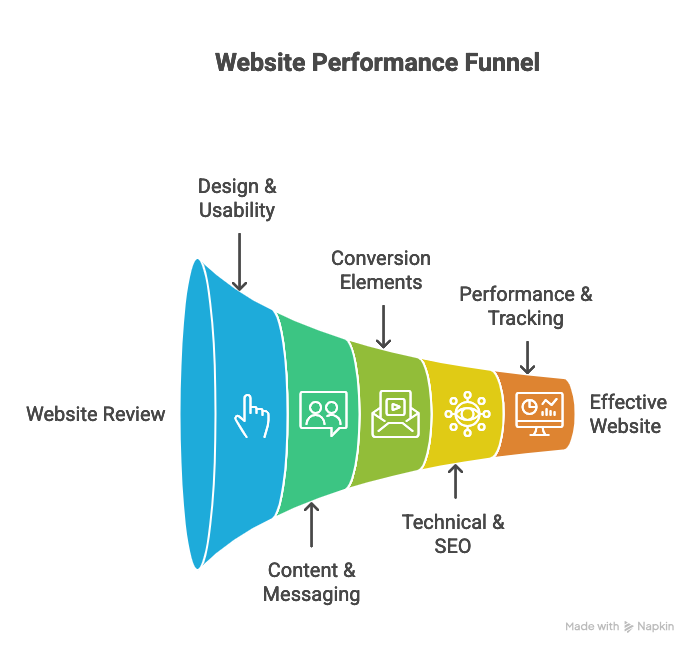
Instead of asking, “Does our website look nice?” I prefer the question: “Is this website actually helping us win customers?”
Here’s how I think through it:
Design & Usability
- When the page loads, does it feel clean and easy to read, or cluttered and overwhelming?
- Can a first-time visitor quickly understand where to go next, or do they have to guess?
- On mobile, is everything easy to tap and scroll, or does it feel frustrating to use?
- Overall, does the site feel like a professional business or something unfinished?
Content & Messaging
- Does the homepage clearly explain who the business helps and what problem it solves?
- Is the content focused on customer needs, or mostly about the company itself?
- Are services explained in terms of outcomes, not just features?
- After reading a few sections, would a visitor understand why they should choose this business over others?
Conversion Elements
- Does each key page clearly guide the visitor toward the next step (contact, book, buy, enquire)?
- Are contact forms simple and easy to complete?
- Are trust signals like testimonials, case studies, or client logos placed near calls-to-action?
- Or do visitors finish reading and have no idea what to do next?
Technical & SEO Basics
- Does the site load quickly, or does it keep people waiting?
- Are there broken links, missing images, or pages that don’t work properly?
- Is the structure clear enough for search engines to understand what each page is about?
- Is the website secure and regularly updated?
Performance & Tracking
- Does the business know how many leads or sales come from the website each month?
- Can they see where visitors come from and what actions they take?
- Is this data used to improve the website, or just sitting in a dashboard?
To me, a good website isn’t the one that looks the most impressive. It’s the one that can confidently answer yes to most of these.
Common Website Mistakes That Hurt Performance
A frequent issue is focusing heavily on visuals while neglecting purpose. A site can look impressive yet fail to guide users or support business goals.
Other issues I often see are unclear action paths, poor mobile experience, and outdated content. These rarely cause dramatic failure, but over time they reduce engagement and conversion.
How Ptech Builds Websites for Business Performance
At Ptech, we don’t treat website development as just a design task. We treat it as a business growth project.
- Strategy is defined before design begins
- Messaging is clarified so visitors understand the offer quickly
- User journeys are structured to encourage action
- Technical foundations support SEO and future scalability
- Tracking systems are built in to enable ongoing optimisation
The result is a website designed to contribute to marketing performance and long-term growth, rather than simply looking good at launch.
If your website looks good but isn’t driving results, it might be time to turn it into a real growth tool. Contact Ptech
FAQs
- How often should a website be updated? Content and performance should be reviewed regularly. Major structural updates may happen less often, but optimisation is ongoing.
- Does every business need a custom website? Not always. The right choice depends on goals, complexity, and growth plans. However, the site must support marketing and conversion needs.
- What’s more important: design or functionality? Both matter, but functionality drives results. A site must look credible while guiding users clearly toward action.